
HTTP(S) Shortcut Breadcrumb
The HTTP(S) Shortcut Breadcrumb creates a decoy shortcut that points to your Trapster honeypot. While it does not contain credentials, any interaction with the shortcut will trigger a breadcrumb alert, helping you detect unauthorized access quickly.
This breadcrumb is lightweight and easy to deploy, making it ideal for testing attacker behavior or monitoring sensitive folders.
Installation
Run the shortcut script using PowerShell
- Right-click the downloaded file and select Run with PowerShell.
- The script will automatically generate a personalized HTTP(S) shortcut pointing to your Trapster honeypot.
Place the shortcut
- Leave the generated shortcut in a location where it might be discovered by an attacker, such as:
- Documents or Downloads folder
- Shared directories
- Any location that mimics real user activity
- Leave the generated shortcut in a location where it might be discovered by an attacker, such as:
Monitoring
- Whenever an attacker attempts to open the shortcut, Trapster will immediately generate a breadcrumb alert.
- Alerts include the time of access and the machine from which the shortcut was triggered.
Screenshots
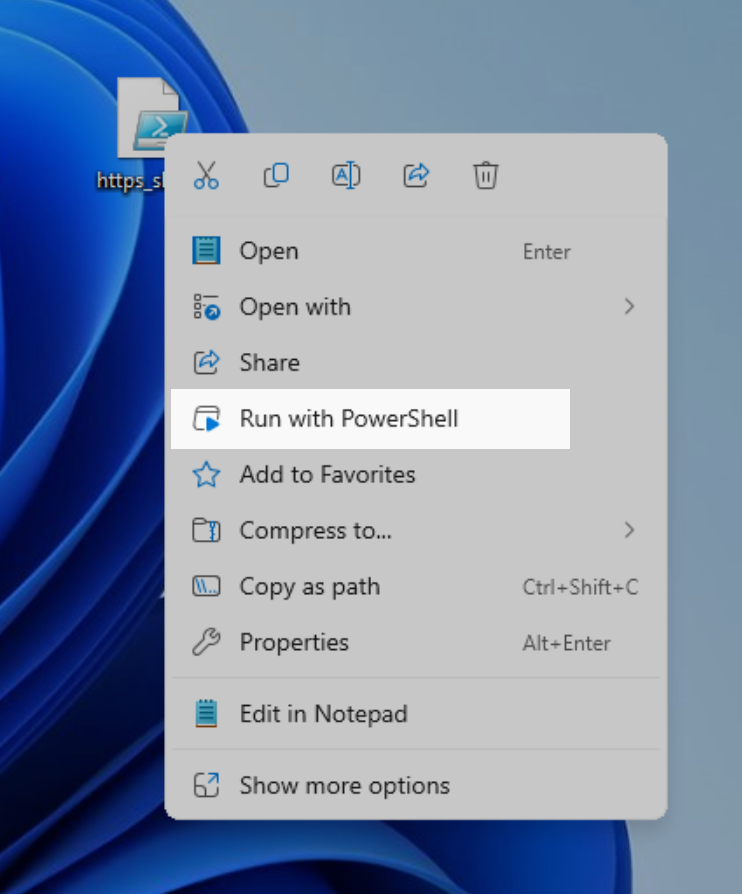
Running the script to generate the shortcut

The generated HTTP(S) shortcut ready for placement